

How can I pay for a class I’ve joined
When class organizers create a class, they choose between two payment options: paid online or paid on-site.
- Paid online: If your class is marked as paid online, you will need to pay for the class before you can register.
- Paid on-site: If your class is marked as paid on-site, you will need to arrange payment with your organizer outside of ClassFit.
How to Check the Payment Option
You can tell if a class is paid online or on-site by checking the class details page as shown below:

Booking Via an Integrated Calendar
If you are booking via an integrated calendar, the payment details will be shown during checkout:
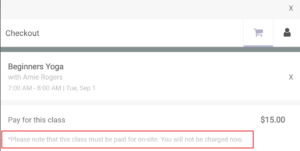
If the class is paid on-site, you will see a message like this:
“Please note that this class must be paid for on-site. You will not be charged now.”
If you need any further help with this, please email us at hello@classfit.com.