

Emailing your class
There may be times when you need to email your class, whether it’s to inform them of a location change, remind them to bring specific equipment, or address any last-minute details. With ClassFit, you can quickly and easily send an email to your entire class directly from your dashboard.
How to Email Your Class
Access the Email Option
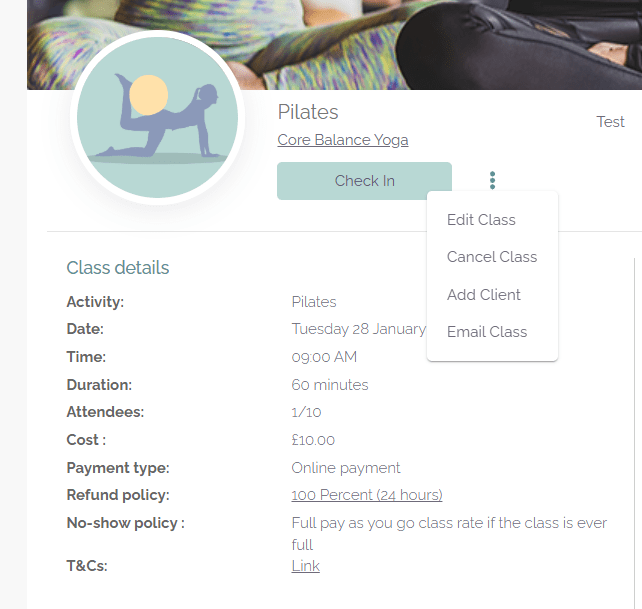
Click on the action button highlighted below and then select Email class.
Navigate to the Class Details Page
Go to the Class Details page of the specific class you want to email.
ClassFit will send the email as if it were from you, including your name, logo, and brand colors. Any replies from your clients will go directly to your inbox.
Need Further Help?
If you have any questions or need further assistance, please contact us at hello@classfit.com.
Select Recipients
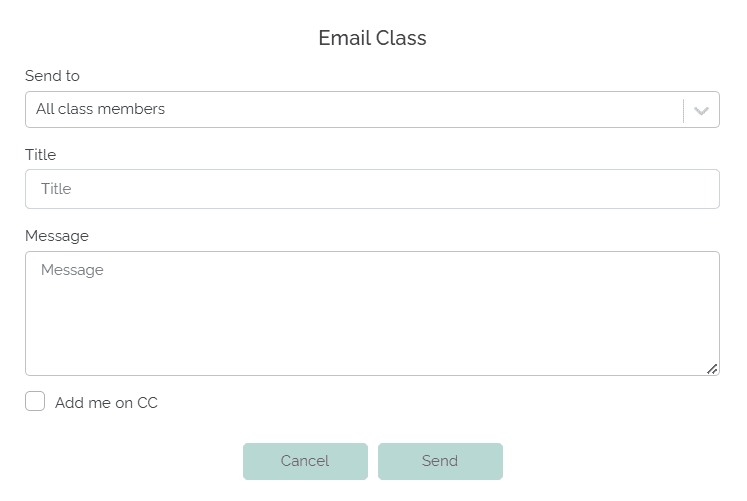
A pop-up window will appear, allowing you to choose who to email:
Compose and Send Your Email
After selecting the recipients, fill in the email title and message. Once you’re ready, click Send.